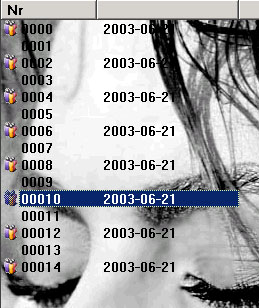
Alltså, tack för alla tips och så. Men här sitter man och blir alldeles röd av att inte komma någon vart alls.
- Det verkar inte spela någon roll om jag lägger till listinnehållet före eller efter jag sätter bakgrundsbilden. Jag provade att plocka ut koden för bakgrundsfärgen för en listview som funkar, och lägga den under en knapp istället. Och det fungerar att sätta bild vare sig listan är tom eller inte.
Bifogar lite rolig kod.
Modul:
Public Const LVS_EX_GRIDLINES = &H1
Public Const LVS_EX_SUBITEMIMAGES = &H2
Public Const LVS_EX_CHECKBOXES = &H4
Public Const LVS_EX_TRACKSELECT = &H8
Public Const LVS_EX_HEADERDRAGDROP = &H10
Public Const LVS_EX_FULLROWSELECT = &H20
Public Const LVS_EX_ONECLICKACTIVATE = &H40
Public Const LVS_EX_TWOCLICKACTIVATE = &H80
Public Type LVBKIMAGE
uFlags As Long
hBmp As Long
pszImage As String
cchImageMax As Long
xOffsetPercent As Long
yOffsetPercent As Long
End Type
Public Declare Function SendMessageAny Lib "user32" Alias "SendMessageA" (ByVal hWnd As Long, ByVal wMsg As Long, ByVal wParam As Long, lParam As Any) As Long
Public Const LVM_FIRST = &H1000
Public Const LVM_SETEXTENDEDLISTVIEWSTYLE = LVM_FIRST + 54
Public Const LVM_GETEXTENDEDLISTVIEWSTYLE = LVM_FIRST + 55
Public Const LVS_FULLROWSELECT = &H20
Public Declare Function SendMessageLong Lib "user32" Alias "SendMessageA" (ByVal hWnd As Long, ByVal wMsg As Long, ByVal wParam As Long, ByVal lParam As Long) As Long
'-------------------------------------------------------
Private Sub Form_Load()
Dim lStyle As Long
Dim tmp As Long
'Set ListView Extended Styles
lStyle = SendMessageLong(ListView1.hWnd, LVM_GETEXTENDEDLISTVIEWSTYLE, 0&, 0&) 'Just uncomment the styles
If frmmain.mnufilmlista_gridlines.Checked = True Then lStyle = lStyle Or LVS_EX_GRIDLINES 'Gridlines in ListView
'lStyle = lStyle Or LVS_EX_GRIDLINES 'Gridlines in ListView
'lStyle = lStyle Or LVS_EX_SUBITEMIMAGES 'Dont know
'lStyle = lStyle Or LVS_EX_CHECKBOXES 'Inserts checkbox beside eachItem
'lStyle = lStyle Or LVS_EX_TRACKSELECT 'Selection follows the mousecursor
lStyle = lStyle Or LVS_EX_HEADERDRAGDROP 'Columns can be moved by draging them
lStyle = lStyle Or LVS_EX_FULLROWSELECT 'Selects the whole row instead of the column one
'lStyle = lStyle Or LVS_EX_ONECLICKACTIVATE 'I don't know, what itsays?
'lStyle = lStyle Or LVS_EX_TWOCLICKACTIVATE 'I don't know, what itsays?
tmp = SendMessageLong(ListView1.hWnd, LVM_SETEXTENDEDLISTVIEWSTYLE, 0&, lStyle)
End Sub
'--------------------------------------------------------
Public Sub Form_Activate()
'sätt färg i listan
ListView1.ForeColor = frmsetupTab.lblexempel.ForeColor
ListView1.BackColor = frmsetupTab.lblexempel.BackColor
ListView1.Font.Bold = frmsetupTab.lblexempel.FontBold
ListView1.Font.Size = frmsetupTab.lblexempel.FontSize
ListView1.Font.Name = frmsetupTab.lblexempel.FontName
Dim BKIMG As LVBKIMAGE
Dim PixPathTile As String
PixPathTile = App.Path & "\bg.gif"
'prepare the backimage structure data
With BKIMG
'use the file provided in pszImage and tile
.uFlags = LVBKIF_SOURCE_URL Or LVBKIF_STYLE_TILE
'the imagefile to display
.pszImage = (PixPathTile)
'h&v offsets for the pix (only if tiled not specified)
'.xOffsetPercent = 0
'.yOffsetPercent = 0
End With
'set the text background to none (transparent) to
'allow image to show through. A RGB() value can
'also be passed to colour the text background
'(to the edge of the control)
Call SendMessageLong(ListView1.hWnd, LVM_SETTEXTBKCOLOR, 0&, CLR_NONE)
'set the image to the listview
Call SendMessageAny(ListView1.hWnd, LVM_SETBKIMAGE, 0&, BKIMG)
End Sub
'----------------------------------------------------------------------
Typ så ser det ut... nånting... Ganska obegripligt. Och det har blivit så mycket api-krafs att jag inte vet riktigt vad som hör till vad... och vad det ska vara bra för.
Och hur får man tag på Visual Basic 6? Vad kostar det? Finns det att köpa i butik?
(knycklar ihop VB5 och kastar ut genom ... ozonlagret!)