Hej
Jag har problem att spara filer som jag vill ha dem i Visual Studio 2005. Jag vill spara dem som UTF-8 utan Unicode Signature (BOM) för att de ska vara utbytbara med ASCII för teckennummer 1-127, fast ändå ha möjlighet att encoda alla andra tecken.
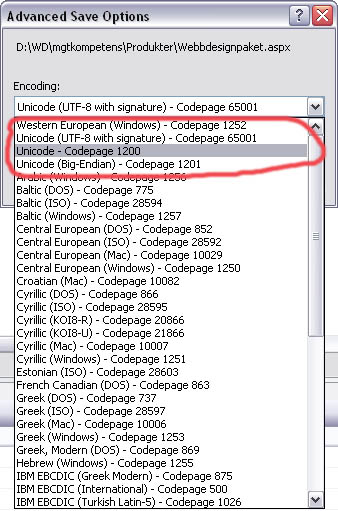
Kolla nu på bifogad fil. Dessa möjligtheter har jag att spara med:
- UTF-8 med BOM - codepage 65001 (varför heter det 65001? det finns ju fler kombinationer???)
- Unicode - Codepage 1200 - small endian - efter lite sökning på google hittade jag en sida från IBM där de skriver
http://publib.boulder.ibm.com/infocenter/db2luw/v8/index.jsp?topic=/com.ibm.db2.udb.doc/admin/c0004821.htm
IBM DB2 skrev:
Within IBM(R), the UCS-2 code page has been registered as code page 1200, with a growing character set; that is, when new characters are added to a code page, the code page number does not change. Code page 1200 always refers to the current version of Unicode.
- Unicode (Big-Endian) - Codepage 1201 - som är big endian. Men ändå UCS-2.
//EDIT: VS05 hade lagt utan BOM en bra bit ner i listan, helt borta från de övriga unicode-formaten.
Sen läser jag här:
http://www.joelonsoftware.com/articles/Unicode.html
So far I've told you three ways of encoding Unicode. The traditional store-it-in-two-byte methods are called UCS-2 (because it has two bytes) or UTF-16 (because it has 16 bits), and you still have to figure out if it's high-endian UCS-2 or low-endian UCS-2. And there's the popular new UTF-8 standard which has the nice property of also working respectably if you have the happy coincidence of English text and braindead programs that are completely unaware that there is anything other than ASCII.
Och i den här tråden som jag hittade när jag sökte så sade de att de hade 4 alternativ: http://www.velocityreviews.com/forums/t65062-which-unicode-encoding-to-use-for-saving-.html
i visual studio. Att det ska finnas 3 alternativ säger även han här: http://www.aspnetresources.com/blog/unicode_in_vsnet.aspx
---------------------------------
I alla fall. Om jag sparar som vanligt, utan att välja spara som och därefter välja encoding, så fungerar det bra i webbläsaren. Men det verkar som alla dokument i så fall sparas som "Wester European (Windows) - Codepage 1252". När jag sedan skriver i min web.config
<globalization requestEncoding="utf-8" responseEncoding="utf-8" fileEncoding="utf-8" />
så skickas också allting som UTF-8 till webbläsaren och det fungerar bra. Men om jag sedan öppnar "webbdesignpaket.aspx" i Dreamweaver som verkar vara mycket bättre på att hålla reda på encoding, så har alla svenska tecken gått förlorade.
Men om jag däremot sparar som och väljer encoding (UTF-8 BOM [eftersom det inte verkar finnas utan BOM i min VS2005]) så visas allting bra i Dreamweaver.
Alltså - mina problem.
- Spara UTF-8 ej BOM (ej signatur) i VS2005 som default.
//edit
och om jag inte kan nå ovanstående mål så är de sekundära målen:
- Spara UTF-8 BOM i VS2005 som default så att jag kan redigera i Dreamweaver.
Allt som står i Visual Studio hjälp är:
VS2005 Hjälp skrev:
You can save files with specific character encoding to support bi-directional languages. You can also specify an encoding when opening a file, so that Visual Studio displays the file correctly.
To save a file with encoding
From the File menu, choose Save File As, and then click the drop-down button next to the Save button.The Advanced Save Options dialog box is displayed.
Under Encoding, select the encoding to use for the file.
Optionally, under Line endings, select the format for end-of-line characters.
This option is useful if you intend to exchange the file with users of a different operating system.
If you want to work with a file that you know is encoded in a specific way, you can tell Visual Studio to use that encoding when opening the file. The method you use depends on whether the file is part of your project.
To open an encoded file that is part of a project
In Solution Explorer, right-click the file and choose Open With.In the Open With dialog box, choose the editor to open the file with.
Many Visual Studio editors, such as the forms editor, will auto-detect the encoding and open the file appropriately. If you choose an editor that allows you to choose an encoding, the Encoding dialog box is displayed.
In the Encoding dialog box, select the encoding that the editor should use.