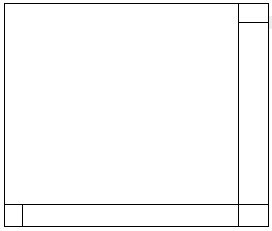
Frågan#1 Jag vill få till ett lager så att det ser ut som i bifogad fil men lyckas inte.
Denna kod har jag hittils
<div style="float: left; width: 173px; height: 157px; margin-right: 8px; margin-bottom: 8px;">
        <div style="float: left; width: 166px; height: 150px;">
          <div style="width: 159px; height: 150px; border: 1px solid #CCCCCC; text-align: center; padding-top: 8px;">
            <img src="bild.jpg"><br>
           <div class="bildArkivText">aaab</div>
          </div>
        </div>
        <div style="float: left; width: 7px; height: 150px; background-color: #CCCCCC;">
          <div style="width: 7px; height: 7px; background-image:url(../bilder/system/skugga/uhh.jpg); background-repeat:no-repeat;"></div>
          <div style="width: 7px; height: 143px; background-image:url(../bilder/system/skugga/h.jpg); background-repeat:repeat-y;"></div>
        </div>
        <div style="float: left; width: 7px; height: 7px; background-image:url(../bilder/system/skugga/nvh.jpg); background-repeat:no-repeat;"></div>
        <div style="float: left; width: 159px; height: 7px; background-image:url(../bilder/system/skugga/n.jpg); background-repeat:repeat-x;"></div>
        <div style="float: left; width: 7px; height: 7px; background-image:url(../bilder/system/skugga/nhh.jpg); background-repeat:no-repeat;"></div>
      </div>
PpettssonMedlem sedan jan. 20021 122 inlägg
<div style="float: left; width: 80%; height: 80%;">
1
</div>
<div style="float: right; width: 19%; height: 20%;">
2
</div>
<div style="float: right; width: 19%; height: 60%;">
3
</div>
<div style="float: left; width: 19%; height: 19%;">
4
</div>
<div style="float: left; width: 60%; height: 19%;">
5
</div>
<div style="float: left; width: 19%; height: 19%;">
6
</div>
Procentsatserna är lite dåliga, men du lär ändra dem ändå.
GGuffaMedlem sedan juni 2004533 inlägg Ändra den tredje div:en från 159x150 till 164x140.
Du får även sätta font-size:0 på vissa div:ar. Internet Explorer har en konstig idé om att en div inte kan vara lägre än ett tecken.
