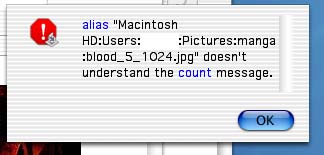
Hej!
Har gjort följande skript för att utföra en process på alla bilder jag importerar från en digitalkamera. Det är i grova drag en kalibrering av kamera jag utför med Photo Retouch Pro 2 från binuscan.
-- the list of file types which will be processed
-- eg: {"PICT", "JPEG", "TIFF", "GIFf"}
property type_list : "JPEG"
-- since file types are optional in Mac OS X,
-- check the name extension if there is no file type
-- NOTE: do not use periods (.) with the items in the name extensions list
-- eg: {"txt", "text", "jpg", "jpeg"}, NOT: {".txt", ".text", ".jpg", ".jpeg"}

property extension_list : {"jpg", "jpeg"}

-- first open PRP
tell application "PhotoRetouch Pro® D"
	activate
end tell

-- This droplet processes files dropped onto the applet
on open these_items
	repeat with i from 1 to the count of these_items
		set this_item to item i of these_items
		set the item_info to info for this_item
		if (folder of the item_info is false) and ¬
			(alias of the item_info is false) and ¬
			((the file type of the item_info is in the type_list) or ¬
				the name extension of the item_info is in the extension_list) then
			process_item(this_item)
		end if
	end repeat
end open

-- finally close PRP
tell application "PhotoRetouch Pro® D"
	quit
end tell
Det funkar att dubbelklicka på droplet:en, den startar Photo Retouch Pro, men när jag släpper en file med type creator = JPEG och filsuffix = .jpg så blir det problem. Hittade koden på Apples AppleScript sida
När jag får detta att funka, med er hjälp som jag vore tacksam för att få, ska droplet:en utökas med funktioner som menyskriptar PhotoRetouch Pro. Undrar hur det kommer gå till? PRP ska i kort gå till en meny och välja en process i dropdown-menyn, sedan ska ok utföras i dialogrutan som då kommer upp. Detta för varje bild.