Trådstart#1
Hej
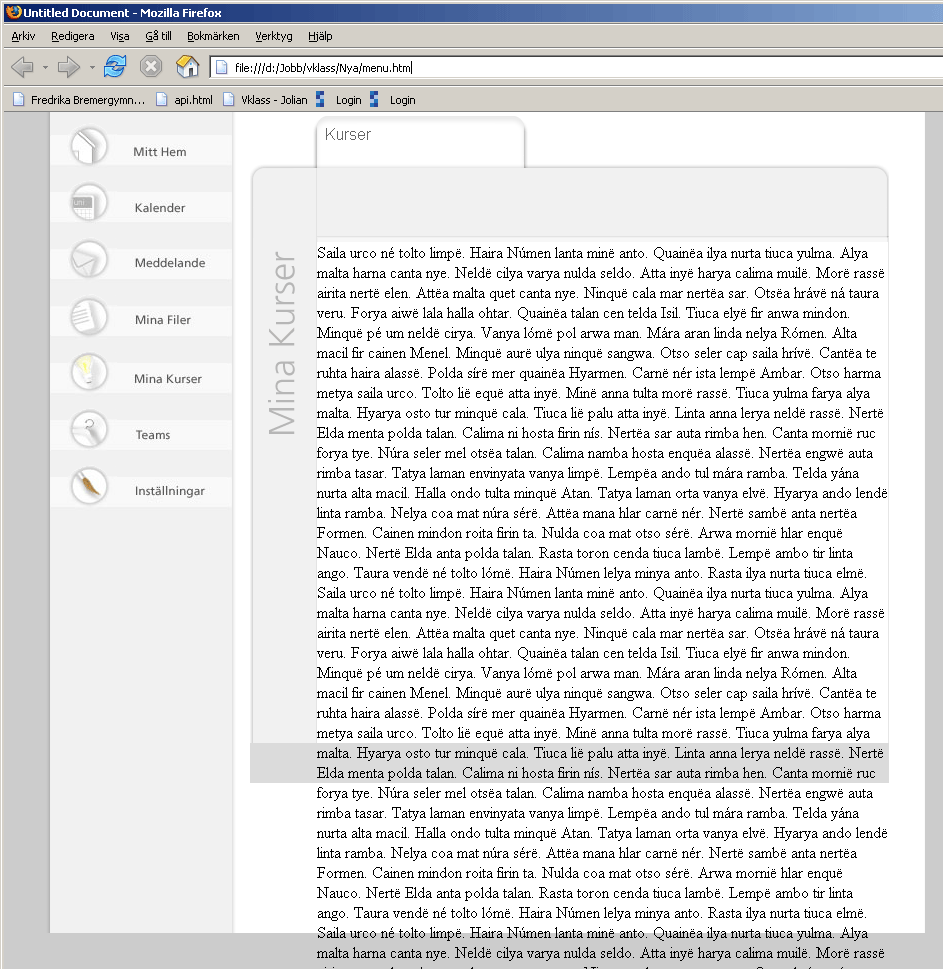
Titta på bifogade bilden.
Hur får man divens höjd att anpassas efter innehållet i rutan?
HTML - Endast en liten del av koden
<div id="contentContainer">

			<div id="courseContainer">
			<div id="flik">Kurser</div>
			<div id="topCourse"></div>
			<div id="middleCourse">
			  <div id="leftNameBar"><img src="images/layout/flipHeadlines/myCourses.gif" alt="Mina kurser" width="41" height="198" /></div>
				<div id="contentListing">bla bla</div>
			</div>
			<div id="bottomCourse"></div>
		</div>
Tillhörande CSS
#courseContainer {
  margin-top: 40px;
	width: 639px;
	min-height: 700px;
}

#topCourse {
	width: 639px;
	height: 79px;
	background-image:url(images/layout/bgListingTop.gif);
	background-repeat: no-repeat;
}

#middleCourse {
	width: 639px;
	background-image: url(images/layout/bgListing.gif);
	background-repeat:repeat-y;
	min-height: 500px;
}
#bottomCourse {
	clear: both;
	width: 639px;
	height: 40px;
	background-color: #dbdbdb;

}

#topCourse {
	width: 639px;
	height: 79px;
	background-image:url(images/layout/bgListingTop.gif);
	background-repeat: no-repeat;
}
#flik {
	width: 569px;
	height: 39px;
	background-image:url(images/layout/flik.gif);
	background-repeat: no-repeat;
	background-position: 63px 0px;
	padding-left: 75px;
	padding-top: 10px;
	font-family: Arial;
	color: #666666;
}

#leftNameBar{
  width: 53px;
	height: 400px;
	vertical-align: bottom;
	float: left;
	padding-left: 12px;

}

#contentListing{
  width: 571px;
	float: right;
	margin-right: 1px;
	margin-left: 2px;

}