Har använt mig av JMails kodtutorial men får det inte att fungera:
Set Pop3 = Server.CreateObject("JMail.Pop3")
Pop3.Connect username, password, mailserver, 110
With Response
	.Write Pop3.Count & " "
	If Pop3.Count > 0 Then
		For i = 1 To Pop3.Count
			Set Msg = Pop3.Messages.Item(i)
			Set Recipients = Msg.Recipients
			For n = 0 To Recipients.Count - 1
				If n = Recipients.Count - 1 Then
					Separator = "; "
				End If
				Set re = Recipitants.Item(n)
				If re.ReType = 0 Then
					ReTo = ReTo & re.Name & " " & re.EMail & """>" & re.EMail & Separator
				Else
					ReCC = ReTo & re.Name & " " & re.EMail & """>" & re.EMail & Separator
				End If
			Next
		Next
		.Write "From: " & Msg.FromName & "<br>"
		.Write "Subj: " & Msg.Subject & "<br>"
		.Write "Rec To: " & ReTo & "<br>"
		.Write "Rec CC: " & ReCC & "<br>"
		.Write "<hr>"
		.Write Msg.Body
		Msg.Disconnect
	Else
		.Write "None there is..."
	End If
End With
Har skickat ett mail till mig själv men Pop3.Count säger fortfarande att jag inte har några mail. Vad tror ni är fel?
This example pops the first email in a given POP3 mailbox and displays it on the webpage together with it's attachments, which in turn are saved to the servers disc.The use of this example is of course limited, however, it shows how you easily can connect to a POP3 server and retrieve emails from a mailbox and also handles attachments in a clever manner.
POP3simple.asp
<% @LANGUAGE=VBSCRIPT %>
<%
Set pop3 = Server.CreateObject( "JMail.POP3" )
pop3.Connect "username", "password", "mail.mydomain.com"
Response.Write( "You have " & pop3.count & " emails in your mailbox!<br><br>" )
if pop3.count > 0 then
Set msg = pop3.Messages.item(1)
' Note the first element of this array is 1
' since the POP3 server starts counting at 1
ReTo = ""
ReCC = ""
Set Recipients = msg.Recipients
separator = ", "
' We now need to get all the recipients,
' both normal and Carbon Copy (CC) recipients
' and store them in a variabel
For i = 0 To Recipients.Count - 1
If i = Recipients.Count - 1 Then
separator = ""
End If
Set re = Recipients.item(i)
If re.ReType = 0 Then
ReTo = ReTo & re.Name & " (" & re.EMail & ")" & separator
else
ReCC = ReTo & re.Name & " (" & re.EMail & ")" & separator
End If
Next
' This function iterates through the Attachments object,
' and saves the attachment to the server's disk.
' It also returns a nicely formatted string with a
' link to the attachment.
Function getAttachments()
Set Attachments = msg.Attachments
separator = ", "
For i = 0 To Attachments.Count - 1
If i = Attachments.Count - 1 Then
separator = ""
End If
Set at = Attachments(i)
at.SaveToFile( "c:\attachments\" & at.Name )
getAttachments = getAttachments & "<a href=""/attachments/" &_
at.Name &""">" & at.Name & "(" & at.Size & " bytes)" &_
"</a>" & separator
Next
End Function
%>
<html>
<body>
<TABLE>
<tr>
<td>Subject</td>
<td><%= msg.Subject %></td>
</tr>
<tr>
<td>From</td>
<td><%= msg.FromName %></td>
</tr>
<tr>
<td>Recipients To</td>
<td><%= ReTO %></td>
</tr>
<tr>
<td>Recipients CC</td>
<td><%= ReCC %></td>
</tr>
<tr>
<td>Attachments</td>
<td><%= getAttachments %></td>
</tr>
<tr>
<td>Body</td>
<td><pre><%= msg.Body %></pre></td>
</tr>
</TABLE>
</body>
</html>
<%
end if
pop3.Disconnect
%>
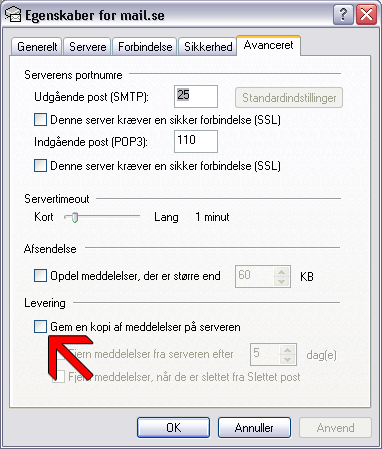
Det här var intressant... när jag loggar in via webben på kontot så finns där inga mail. men jag har gjort samma inställning i outlook och där ser jag klart och tydligt mina tre mail jag skickat till mig...
ok, när jag tog bort mitt konto i outlook så fungerar det. antar att jag klipper ut mailen så de inte finns kvar på servern istället för att kopiera. : /
Okej, då var det som vi misstänkte då, inga mejl egentligen
Uppenbarligen kunde den connecta till server och ett konto för annars hade du fått ett felmeddelande.
Det är ju en inställning i Outlook och outlook express. Nu kör jag mot Exchange server med Outlook men jag kan visa från Outlook Express med POP3 inställningar: